

The Complete Guide to AI Instagram Post Makers for a Consistent Brand Look
Introduction
Maintaining a clean and regular Instagram feed may be more challenging than it appears.
You may have a definite brand style in mind, but when content begins to accumulate, things become different. Fonts get swapped. Colors don’t quite match. Layouts feel rushed. It is not the absence of creativity but it is the stress of having to continue posting without exhaustion.
It is at that point that AI Instagram Post Makers come in to save the day.
These tools assist brands to remain visually consistent even in case of a rise in content volume. With an understanding of your brand colors, fonts and design inclinations, AI can replicate the visual with posts, campaigns and formats without having to create a fresh set of designs each time.
AI enables social media teams to work quicker without compromising quality. Solopreneurs apply it to maintain their feeds in an elegant state without employing designers. Agencies use it to handle various brands without sacrificing the distinct appearance of each client.
AI isn’t here to take over creativity. It’s here to maintain your brand aesthetic, to ensure that each post will still look like you, even when you are at your busiest.
What Are AI Instagram Post Makers?
Have you ever been scrolling through your Instagram feed and wondered why your posts don’t quite fit together? You’re not alone.
Creating a clean, consistent aesthetic takes time and effort. That’s where AI Instagram post makers come in.
These apps use artificial intelligence to help you design Instagram posts that look polished and stay true to your brand. You don’t have to create everything manually every time.
The best AI for Instagram posts ensures visual consistency across your feed. They help with captions, spacing, and overall alignment, so your feed feels intentional rather than accidental.
Behind the scenes, these tools work by:
- Identifying design trends that appear to be balanced and professional on Instagram.
- Learning your brand’s colors, fonts, and style preferences
- Posts that are matched with copy and visuals seem to be coherent.
- Using smart templates that adapt to your content instead of forcing rigid designs
It’s also important to clear up what AI Instagram post makers are not.
They’re not shortcuts to instant virality. They don’t replace your brand strategy or creative thinking. And they will not operate your Instagram account on autopilot.
Rather, consider them as a design partner, one that can alleviate creative burnout, guard your brand aesthetic, and feel like it is easier to always show up with work that actually resembles you.
Why Use AI for Instagram Post Creation?
Keeping your Instagram feed clean and consistent takes more than good taste, it takes time, focus, and a lot of repetition. And that’s where AI for Instagram content becomes genuinely helpful.
- Brand Consistency at Scale
Once you set your colors, fonts, and layout style, AI ensures every post stays on brand. You no longer need to guess which font to use or whether a design “feels right.”
All posts follow the same visual standards, keeping your feed purposeful, even when posting frequently.
Faster Content Production
AI can generate multiple versions of a post in minutes, saving hours of manual effort.
This makes weekly or monthly content planning easier, reduces pressure, and prevents last-minute panic when filling your content calendar.
Lower Design Costs
For startups, small teams, or solo creators, AI reduces the need to outsource design work.
You retain creative control while cutting time and costs associated with hiring designers for routine posts.
Designs that get better with time
AI doesn’t just create, it learns.
It tracks which layouts, colors, and styles get the most engagement and uses that data to improve future posts. The result? A feed that stays clean, cohesive, and increasingly effective.
Which Core Elements of an Instagram Post Can AI Improve?
When it comes to keeping your Instagram feed polished and on-brand, AI Instagram post makers are more than just time-savers, they act like your personal design assistant, guiding you through every element of a post.
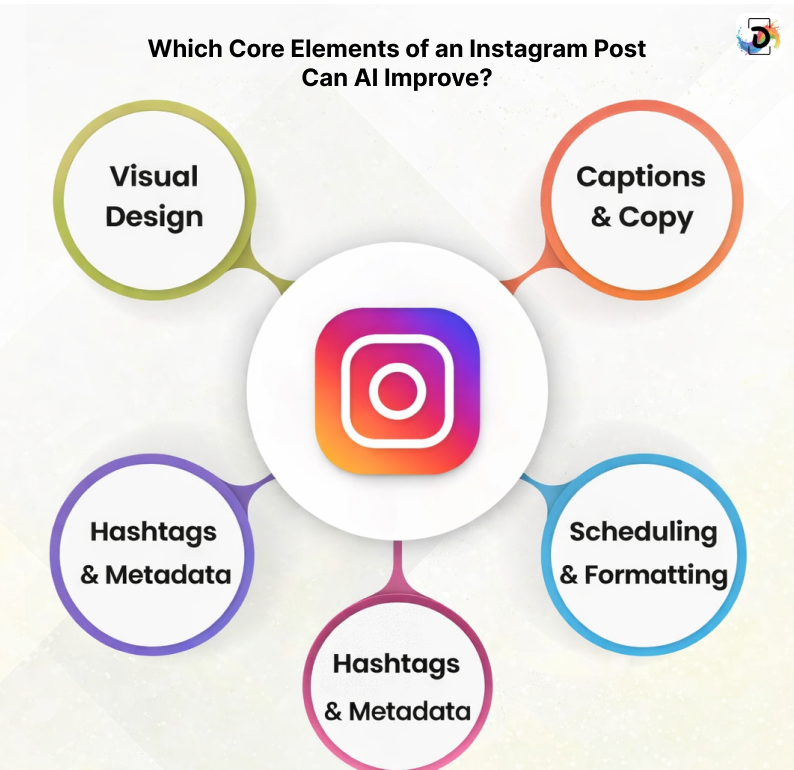
Visual Design
AI handles the most time-consuming parts of visual design.
- Suggests templates that match your brand style
- Ensures balanced image placement for a cohesive feed
- Recommends color palettes and font pairings
Even if you’re not a design pro, the best AI design app helps every post maintain the right tone and feel.
Captions & Copy
Crafting engaging captions can be challenging. AI makes it easier to:
- Write catchy hooks that grab attention
- Streamline calls-to-action without feeling pushy
- Adjust tone, emojis, and style to stay on-brand
Your captions will feel natural while consistently reflecting your brand voice.
Hashtags & Metadata
AI ensures your posts reach the right audience.
- Suggests niche-specific hashtags
- Optimizes caption length for maximum engagement
- Enhances metadata to increase post visibility
These features help your content stand out instead of getting lost in the feed.
Scheduling & Formatting
The right format and timing are just as important as design. AI can:
- Preview how your feed will look overall
- Recommend content types like carousel or reel
- Ensure images stay within story-safe areas
This ensures every post is intentional, professional, and visually harmonious.
How Can You Use AI to Create an Instagram Post?
Making Instagram posts with AI does not need to be a guessing game. It is like having an intelligent design assistant that makes you remain consistent and still save time. Here’s how you can do it:
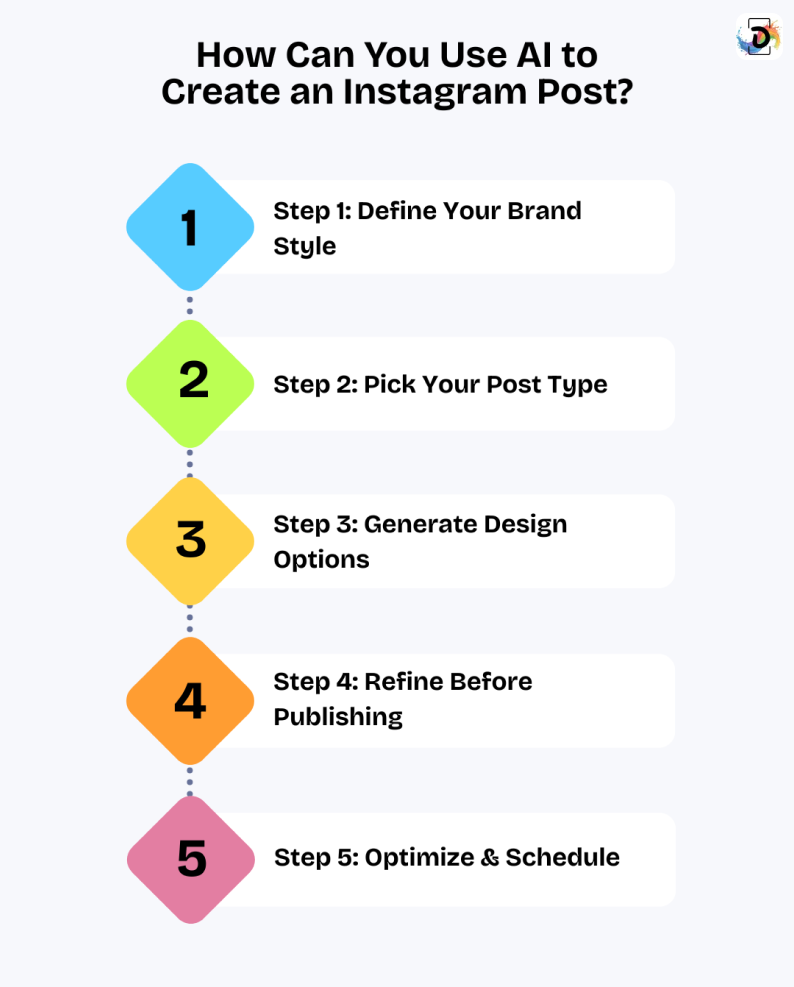
Step 1: Define Your Brand Style
Before letting AI create content, make sure your brand voice and visuals are clear.
- Add your brand kit, including logos, colors, and fonts.
- Decide on your overall tone: playful, minimalist, or professional.
With these elements in place, AI can generate posts that feel consistent and on-brand
Step 2: Pick Your Post Type
Different posts are used to fulfill different functions, pick which one best suits your purpose:
- Carousel posts for storytelling or tips
- Use quotations to motivate your readers.
- Promotional posts for products or offers
- Educational posts to add value
Step 3: Generate Design Options
Now let the AI do its thing. It will propose designs, color tweaks, and caption ideas. Select a few of them and compare them to identify the one that best suits your feed. Think of it like experimenting in Adobe Photoshop, but way faster and smarter.
Step 4: Refine Before Publishing
AI gives you a head start, but don’t publish blindly.
- Adjust spacing and layout for readability.
- Customize captions to match your brand’s tone.
- Replace stock images where needed.
These refinements help maintain a professional, cohesive feed.
Step 5: Optimize & Schedule
Make your posts work harder for engagement.
- Double-check hashtags and optimize calls-to-action.
- Choose the best time to post for your audience.
- Once satisfied, schedule the post and let your AI assistant manage consistency.
This ensures your feed stays polished, active, and on-brand.
What Are the Top AI Tools for Instagram Content Creation in 2026?
Creating Instagram posts that look professional and consistent doesn’t have to be a headache. With the right AI tools, you can maintain a clean aesthetic, save time, and still stay true to your brand. Here are some of the top AI solutions social teams, solopreneurs, and agencies are using today:
| Tool | Best For | Why You’ll Love It | Pro Tip |
| Canva AI | Beginners & small brands | Quickly creates posts that match your brand colors, fonts, and templates | Stick to your brand kit to keep your feed cohesive without starting from scratch. |
| Predis.ai | Social marketers | Generates both visuals and captions together | Perfect for planning campaigns with matching designs and copy. |
| VistaCreate | Creators with design-heavy feeds | Clean, stylish layouts for posts and carousels | Great for keeping a polished look across your entire feed. |
| Adobe Express AI | Professionals & agencies | High-quality, precise designs | Use for premium visuals where every detail counts. |
| Buffer AI Assistant | Scheduling & planning | Suggests content timing and optimizes posts | Keep your feed consistent and never miss peak posting times. |
| InVideo AI | Video & motion content | Turns static designs into animated posts or reels | Bring your feed to life while staying on-brand |
| Flick | Hashtag research | Finds the best hashtags for reach & engagement | Boost discoverability without breaking your feed’s aesthetic. |
| ChatGPT | Captions & creative ideas | Helps write captions, scripts, and post concepts | Use it to maintain a consistent voice while saving brainstorming time. |
Which AI Mistakes Should You Avoid on Instagram?
Even the most intelligent AI applications will give you a sloppy output when you are not cautious. The following are the tips to keep in mind when using AI Instagram Post Makers to preserve a clean and professional look:
1. Overusing Generic Templates
It’s tempting to rely on ready-made designs from AI poster makers.
But if all your posts follow the same template, your feed can become monotonous and boring.
Tip: Use templates as a starting point. Customize colors, fonts, and layout elements to make each post feel unique and aligned with your brand.
2. Skipping Brand Customization
AI doesn’t automatically know your brand identity.
Fonts, colors, logos, and spacing are essential for a consistent visual style.
Tip: Always upload your brand kit and refine AI suggestions. This ensures every post matches your brand guidelines and maintains visual harmony.
3. Repeating AI-Generated Phrases
Copying AI-generated captions directly can make your content feel generic or unnatural.
Tip: Mix in your own tone, personality, and storytelling. Authentic captions engage your audience and make your content feel human.
4. Ignoring Visual Hierarchy
AI can’t fully replace a designer’s eye for balance.
Key elements like visuals, headlines, and CTAs must stand out, while secondary details remain subtle.
Tip: Pay attention to layout and emphasis. Poor hierarchy can make posts cluttered, confusing, or overwhelming.
5. Relying Solely on AI Captions
AI is a time-saver, but your audience connects with people, not algorithms.
Tip: Use AI for drafting, but always revise and personalize captions. Thoughtfully crafted text builds trust and keeps your feed relatable.
What Are the Best Ways to Optimize AI-Generated Instagram Posts?
AI Instagram post makers can accelerate the creation of content, but quality and sophistication are achieved through refining what AI provides you with. A few intentional tweaks can make the difference between a feed that looks automated and one that feels thoughtfully designed.
Design Optimization
A clean Instagram aesthetic relies on restraint.
- Use white space to let your content breathe and avoid a crowded look.
- Stick to one or two font types for a harmonized design.
- Ensure strong contrast so your message is readable at a glance.
Simplicity and clarity like in well-crafted business flyer templates make your graphics feel familiar and trustworthy.
Content Optimization
AI-generated captions are a strong starting point, but your audience connects to your voice, not the algorithm.
- Rewrite the hook in your own words to make it sound natural.
- Add a short insight, opinion, or brand context to give it a personal touch.
- Treat AI captions as rough drafts, not final copy.
This approach ensures your content feels purposeful instead of generic.
Engagement Optimization
Aesthetic content alone isn’t enough; your feed must encourage interaction.
- Ask thoughtful questions to spark conversation.
- Use carousels to tell short stories or break ideas into digestible chunks.
- Balance design with substance to keep people returning.
When visuals and meaningful content work together, your posts feel polished, engaging, and intentional.
Conclusion
AI Instagram Post Makers have taken a lot of pressure out of showing up consistently on Instagram. They help you design faster, write smarter, and stay visually aligned without burning out. However, they do not replace creativity, but rather work best in favor of it.
Get AI to deal with the structure, and intervene to bring your point of view, personality and brand voice. Post what is right, not wrong and make adjustments along the way and be purposeful with each post. When AI and human creativity collaborate, it becomes less complex to maintain the clean aesthetics, and it is natural to transform that stability into actual growth.
Frequently Asked Questions (FAQs)
Yes. The number of AI tools available to assist you in making Instagram posts is plenty.
There are tools that are centered on visual design and images, including Canva, Adobe Express, and Recraft. They assist in the creation of layouts, graphics and images through basic text prompts.
Other tools are focused on captions and hashtags. Social media tools such as Predis.ai, Flick, and OwlyWriter by Buffer propose post copy and hashtags, which are brand and audience-specific.
Combined, these AI products will help you post regularly and keep your visuals original and your content captivating.
Yes! ChatGPT is capable of assisting you with creating Instagram posts in a variety of ways. It is capable of creating content ideas, writing captions, creating video scripts, proposing hashtags, and even creating image prompts to other AI applications. Think of it as a powerful assistant that speeds up your content creation.
Nevertheless, to really connect, your posts require ChatGPT and your brand voice and strategy. You can brainstorm new content, test out different styles of caption funny, inspirational, or educational posts, outline carousel posts or come up with text in visual design tools, such as Canva.