

DrawPost Explained: How Creators and Small Businesses Design Faster with AI
Introduction
For many creators and small business owners, design is often the slowest part of content creation. You know what you want to share, but turning that idea into a clean, professional visual can take time, skills, and resources you may not have.
That’s where DrawPost comes in.
DrawPost is an AI-assisted graphic design app built to help you create posters, social media posts, and logos, without prior design experience or complex software. It removes the friction that usually comes with visual content creation
The app is designed for:
- Creators who need to post consistently
- Small businesses that want a professional look
- Teams and groups that need fast, reliable visuals
Instead of spending hours learning layouts or navigating design tools, DrawPost lets you design quickly and confidently. This means your content stays fresh and professional, even on your busiest days.
How Do You Get Started With DrawPost?
DrawPost is not as difficult to get started with as you might think. Although you may have never designed anything, you can still make your first draw poster within a few minutes. Here’s a simple guide to get you up and running:
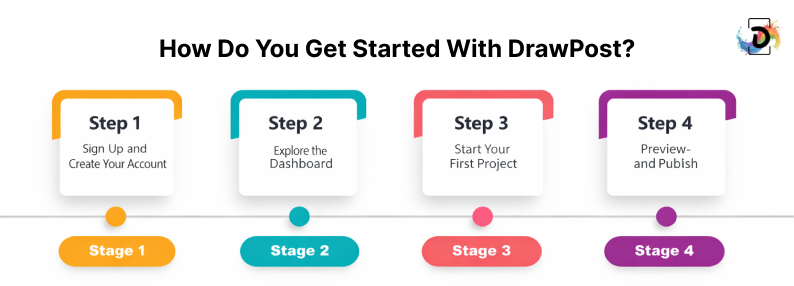
- Sign Up and Create Your Account
To get started, create your DrawPost account. Enter your email, set a password, and you’re in!
If you want to experiment first, the free trial lets you access all essential tools, no credit card required.
Your account saves all your projects automatically. This means you can pick up right where you left off anytime.
- Explore the Dashboard
As soon as you are logged in, the dashboard is a creative center. Here you can:
- See your recent projects at a glance
- Browse ready-made templates
- Access design tools and assets
Spend some time and navigate the site and get used to the format. Everything is made user-friendly and you will not have to spend time locating what you require. Having all that information at your fingertips makes your design process even faster and less annoying.
- Start Your First Project
Click “New Project” and pick a template or start from scratch. Then:
- Add and customize text
- Insert images or icons
- Adjust colors to fit your style or brand
The drag-and-drop editor allows you to organize things easily, and you can easily test out things without having to worry about errors. Even a solo creator can create a presentable draw poster in a matter of less than 15 minutes.
- Preview and Publish
Once your design is ready, preview it to check alignment and overall balance.
After reviewing, you can:
- Download your design
- Share it on social media
- Bookmark it for future use
Previewing ensures your work looks professional. Publishing directly from DrawPost saves time by keeping all your projects in one place.
Which Core Features Make DrawPost Different From Other Design Tools?
Making professional-looking visuals doesn’t have to be complicated. DrawPost is built to help you create beautiful designs like digital posters and flyers quickly and easily.
Whether you’re a content creator, marketer, or small business owner, the platform removes the usual design barriers and lets you focus on your message.
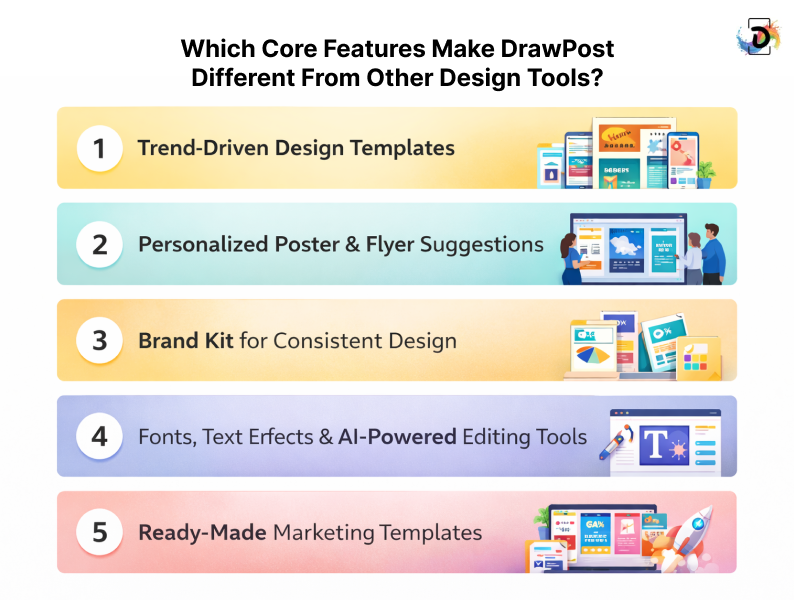
Below are the core features you’ll use the most.
1. Trend-Driven Design Templates
Staying visually relevant can be difficult when design trends change fast. DrawPost solves this by offering templates that are regularly updated based on trends, seasons, festivals, and popular events.
These templates reflect what people are already engaging with online. As a result, your designs feel timely instead of outdated.
You don’t need to worry about layouts or styles. Simply choose a template, add your text, images, and branding, and you’re ready to go.
2. Personalized Poster & Flyer Suggestions
DrawPost becomes smarter the more you use it. Once you upload your logo and start creating designs, the app learns from your previous projects.
Based on this activity, it suggests poster and flyer designs that match your brand style. This saves time and removes the need to start from scratch.
Over time, your designs become more consistent, recognizable, and aligned with your brand identity.
3. Brand Kit for Consistent Design
Consistency builds trust, but managing brand colors, fonts, and logos can be frustrating. DrawPost’s Brand Kit keeps all your branding elements in one place.
Your saved colors, fonts, and logos are always available when starting a new design. This ensures every visual stays on-brand.
This feature is especially helpful for small businesses and creators who want a professional look without hiring a designer.
4. Fonts, Text Effects & AI-Powered Editing Tools
Text plays a key role in visual communication. DrawPost offers over 500 fonts along with creative text effects to help your message stand out.
You can easily adjust spacing, emphasis, and styling for better readability and impact.
The platform also includes artificial intelligence (AI) tools like background removal. These tools help clean up images, remove distractions, and highlight products without needing separate editing software.
5. Ready-Made Marketing Templates
DrawPost includes a wide range of professionally designed marketing templates for promotions, announcements, and events.
Each template is carefully balanced for text, images, and spacing. This makes it easy to create visuals that look polished and professional.
Because of this, many users consider DrawPost one of the best flyer maker apps for creating designs that look great both online and in print.
6. Easy Sharing & Print-Ready Exports
Once your design is complete, sharing it is simple. DrawPost lets you export high-resolution files in formats like PNG and PDF.
These exports stay crisp across platforms and print materials. You can also post directly to social platforms such as Instagram, Facebook, and WhatsApp.
Whether you’re sharing online or printing for an event or promotion, quality remains consistent.
How Does DrawPost Scale and Support Your Design Workflow?
Here’s a closer look at what makes DrawPost stand out in scaling your design:
1. Optimized Workflow Automation
DrawPost reduces manual effort by automating everyday design tasks. Common actions like resizing graphics for different platforms or duplicating templates across projects happen automatically.
This saves time and removes repetitive work, allowing designers to focus on creative decisions instead of navigating menus and redoing the same steps.
2. Stable Assets across Projects
Maintaining brand consistency becomes difficult when working on multiple designs. DrawPost solves this by letting teams reuse logos, color palettes, fonts, and templates across projects.
This ensures every post, poster, or social graphic stays on-brand without extra manual checks.
3. Multi-Brand and Multi-Client Management
Managing multiple brands or client accounts can quickly become confusing. DrawPost keeps all projects organized in one central workspace.
Teams can switch between brands easily, reducing mistakes, confusion, and wasted time.
4. Data-Driven Insights
Designing content is only part of the process. Understanding how it performs is just as important. DrawPost provides analytics that help track engagement and audience response.
These insights allow teams to refine designs and make informed decisions based on what performs best.
Real-World Use Case
For a small agency managing 10+ client pages, DrawPost simplifies asset sharing, template reuse, and brand consistency. It also speeds up content production while reducing errors.
This combination of automation, organization, and insight is why many growing teams consider DrawPost one of the best AI design apps for high-volume content creation.
Why Should You Use DrawPost for Visual Content?
Creating visuals shouldn’t slow your team down. DrawPost is built to save time, reduce stress, and help teams produce professional-quality content without the usual design headaches.
Here’s how it makes a real difference.
1. Faster Content Production
DrawPost removes unnecessary steps from the design process. Instead of juggling multiple tools or recreating designs from scratch, teams can generate polished visuals in minutes.
This frees up time to focus on strategy, messaging, and creative ideas rather than production work.
2. Reduced Tool Switching
Many teams lose hours moving between tools for design, scheduling, and approvals. DrawPost brings everything into a single platform.
With fewer tools to manage, workflows stay focused and productivity improves.
3. Better Brand Consistency
Maintaining a consistent brand identity becomes much easier with DrawPost. Built-in templates, color palettes, and reusable design elements ensure every asset follows your brand guidelines.
This reduces errors and keeps messaging clear across all channels.
4. Enhanced Team Cooperation.
DrawPost supports real-time editing, comments, and easy sharing. Designers, marketers, and stakeholders can work together without long back-and-forth cycles.
Approvals happen faster, and projects move forward smoothly.
5. Lower Onboarding Friction for New Hires
New team members can start creating content almost immediately. The intuitive interface, guided templates, and helpful AI features reduce training time.
This makes onboarding faster and less disruptive for growing teams.
6. Experiment Without Risk Using a Free AI Poster Maker
DrawPost also works as a free AI poster maker, making it easy to test ideas without upfront costs.
Teams can explore designs, experiment with layouts, and see how DrawPost fits into their workflow before committing.
Getting Started with a Free Trial
Curious to see what DrawPost can do without committing right away? The best way to experience all the main features and see why it is being called one of the simplest apps to create visual content is a free trial where you can design your social media posts, logos, or even use it as your best flyer maker app.
Here’s what you can expect:
- What comes with it: You will receive the basics of design tools, a range of templates to utilize and some basic collaboration functionality so that you can begin creating immediately.
- What’s limited: There are premium templates, more complex analytics, and multi-brand management functionality only in paid plans, yet you will have enough to play with.
- Who it suits: Ideal for content makers, small-scale business owners/marketers that wish to test the platform and get to the upgrading stage.
It is simple to start, no credit card required and you can cancel at any time. Should you choose to go the extra mile, then you can upgrade and plans can be expanded to match your requirements.
Final Thoughts
There is no need to make the process of getting started with visual content difficult and time-consuming. DrawPost is a single, easy-to-use, intuitive platform, allowing you to design, collaborate, and publish without having to balance between using many tools or having to use advanced design skills.
DrawPost works for different needs. Content creators can stay consistent, small business owners can build a stronger brand presence, and marketers can meet tight deadlines without added pressure. The streamlined workflow helps you move from idea to finished design much faster.
With an easy-to-use interface, smart design features, and a risk-free trial, you can explore what works best for you before making any commitment.
If you’re looking for a simple way to create professional visuals with less stress and more confidence, starting with DrawPost is a practical first step.
Frequently Asked Questions (FAQs)
DrawPost is a graphic design mobile application based on AI that enables you to produce eye-catching images without straining. In a few steps, you can create posters, social media posts, flyers, and logos.
It is created with content creators, small business owners and beginners in mind who would like to have a professional-looking design without the help of complex design software. Using DrawPost, one can make quality images quickly, easily and without being stressed.
DrawPost is designed to help anyone who has to make beautiful, clean graphics without having to struggle with the complex design tools.
It works well with creators, small business owners, and marketers that need to create social media posts, marketing assets, and brand resources faster.
Yes. DrawPost is oriented to beginners. The app is designed to serve small businesses and content creators as well as those who require a fast and stress-free means of creating visuals. There is no prior design experience or technical skills necessary in order to start.
It is all straightforward, easy to understand and operate. This way you can make your designs look professional without having to work with complex software.